No card required · 5-day FULL ACCESS trial

Focus, reset, or wind down.Hear the signal. See what’s playing.

Choose a session for the moment. BIFROST generates the left and right audio live on your device, layers it with music or ambience, and shows the frequencies and their difference while you listen.

No card required · no automatic charge after the trial

Free plan with no time limitNo installation requiredNo card required
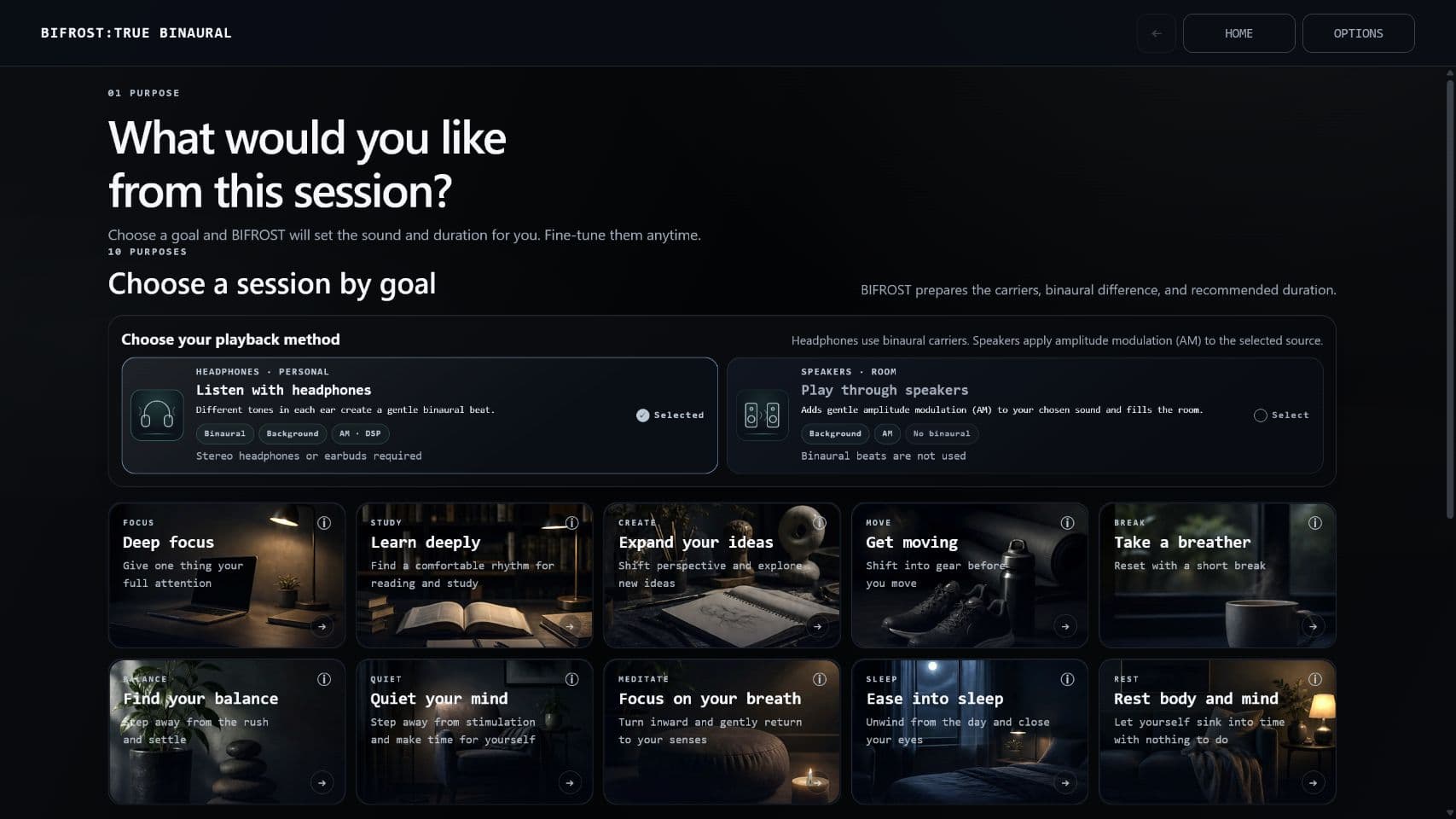
In-app screen · The headphone goal screen
The BIFROST home screen, showing ten purposes to choose from
10
Ten goal-based sessions
19
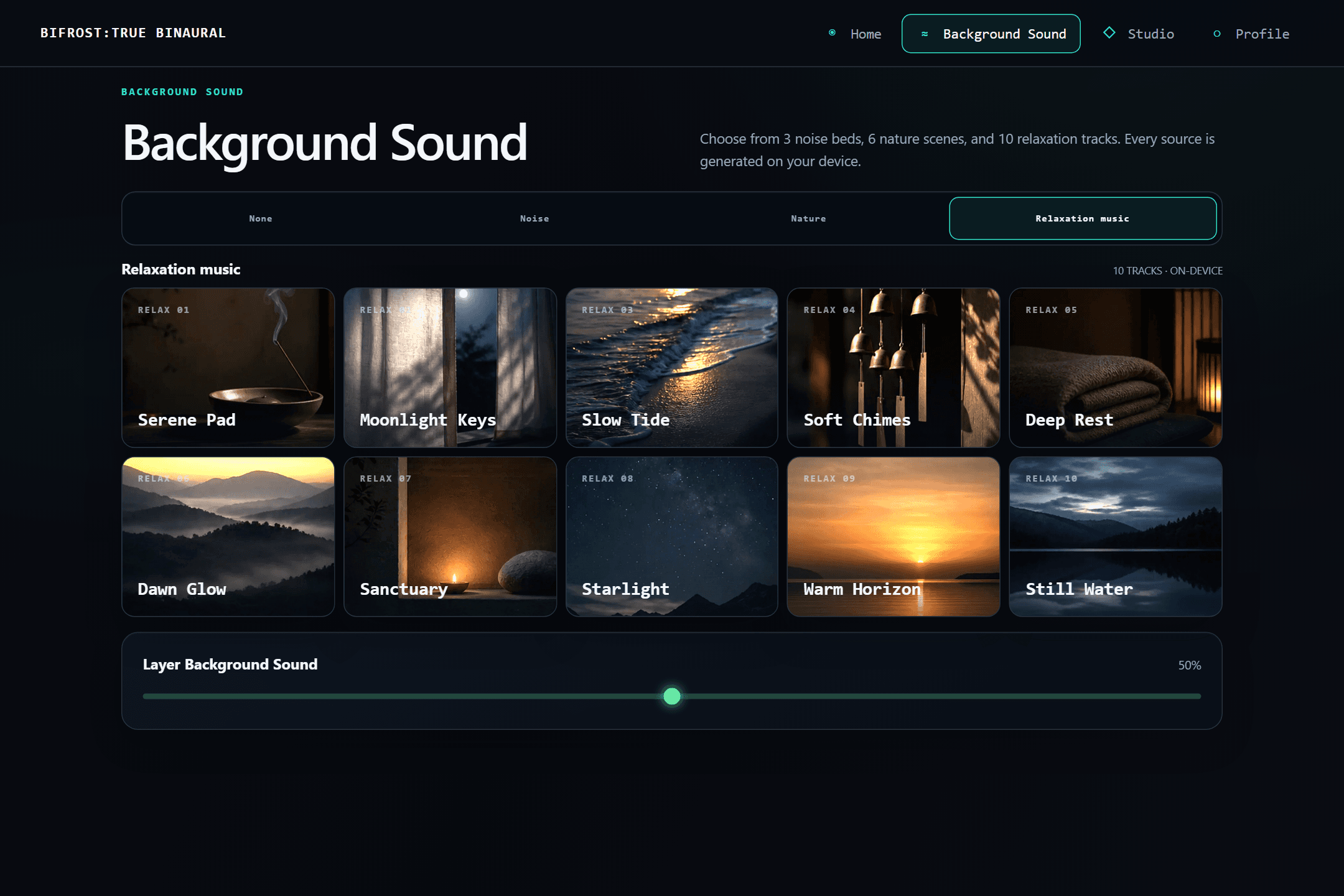
Layer 19 background sounds
156
156 fields recorded over time
01
Choose a sound for the moment
02
See live frequencies and their difference
03
Save a session log
Hear the difference

Preview BIFROST binaural audio.

This 18-second preview combines a higher-frequency binaural carrier pair, Phase Sync, DNEQ 2.0 in ULTRA mode, and BIFROST relaxation music.

BIFROST binaural signal chain
Still Water · 432 INTELLECTUAL CALM
Ready to play0:00 / 0:18
L 432 HzR 422 HzΔ 10 Hz10 Hz AMDNEQ ULTRA

Headphones or earphones are required for binaural separation. Through speakers you may still hear the carriers and AM pulse, but the channels will not remain isolated, so this is not binaural playback. The app’s Speaker mode uses a separate route. Start at a low volume.

Choose binaural audio you can see and tune.

BIFROST brings a live binaural signal, Phase Sync (synchronized AM), DNEQ 2.0 in ULTRA mode, and calm music into one adjustable listening space. If the preview feels right, shape the full experience for your own routine.

No card required · no automatic charge after the trial · No installation required
Start here

What are binaural beats and amplitude modulation?

Both deliver rhythm through sound, but they work—and feel—differently. A binaural beat is perceived from the frequency difference between the ears; AM creates rhythm by changing the loudness of the sound itself. BIFROST uses each where it fits the listening device and your intent.

MECHANISM 01
Headphones or earphones required

Binaural beats

When each ear receives a slightly different frequency, you can perceive a third rhythmic pulse at the difference between them. With 263Hz on the left and 249Hz on the right, that pulse is 14Hz. BIFROST offers this gentle rhythmic cue for listening environments built around focus, unwinding, meditation, or sleep preparation. Headphones or earphones are required to keep the channels separate.

L 263Hz / R 249Hz
= a 14Hz pulse
Why people use it

Binaural beats are commonly explored as part of routines for focus, relaxation, meditation, or winding down before sleep.

When AM is enabled in headphone mode, it modulates the carriers only. The background remains unmodulated, preserving the shape of music and ambience.

MECHANISM 02
Designed for speaker playback

Amplitude modulation (AM)

AM makes the selected noise, ambience, or music rise and fall in loudness on a repeating cycle. It gives the sound a clear rhythmic contour that is easy to follow, helping you settle into a session and find the pulse again if your attention drifts. Because the pulse is carried by the sound itself, it remains audible through speakers.

The loudness itself rises and falls on a cycle
Why people use it

AM creates a clearly repeating rise and fall in loudness, adding a pulse you can hear and follow without having to understand the technology behind it.

In headphone mode, AM can be applied only to the carriers while music stays intact. In speaker mode, it shapes the selected source itself. This is a different experience from binaural playback.

Two rhythms. One listening environment shaped for your moment.

A binaural beat can create a gentle pulse perceived between the ears, while AM gives the sound an audible rise and fall. BIFROST layers both with relaxation music, then lets you choose a session for focus, unwinding, meditation, or sleep preparation. The experience is personal—listen and decide how it fits your routine.

BIFROST is developed as an acoustic tool, not a medical device. It is not intended to diagnose, treat, cure, or prevent any condition. Experiences vary.

For moments like these

The right sound for this moment.

When getting started feels difficult, when you need to shift gears, or when you want a quieter end to the day. Choose what you need right now and begin.

01
Focus

Give one task your attention

For the moments when distractions keep you from beginning. Set aside time to turn your attention to the task in front of you.

FOCUS · STUDY / available on FREE
02
Reset

Make room between tasks

Between meetings or before moving to the next task. Pause for a moment and create some space to shift gears.

BREAK · BALANCE
03
Rest

Ease into a quieter evening

For nights when thoughts keep circling. Step back from the day's stimulation and make time to settle down quietly.

SLEEP · REST
How it works

Choose how to listen. Review. Press play.

Choose headphones or speakers first. BIFROST then shows the settings for that playback method and lets you review them before starting.

01

Choose your playback method

For headphones, choose one of ten goals. For speakers, choose the source that will receive AM. Speaker playback is available on FULL ACCESS.

02

Choose the session or source

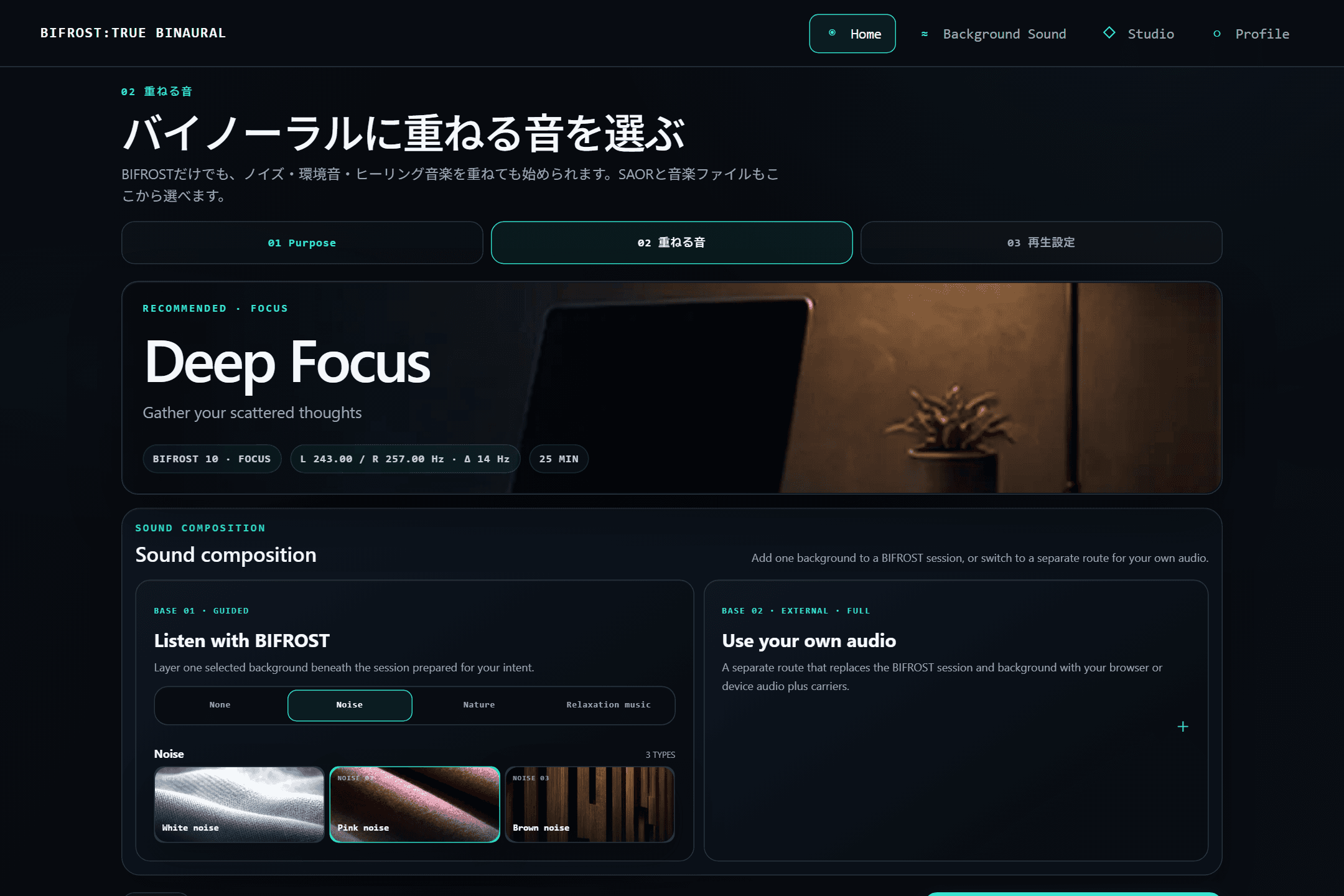
For headphones, set a goal and add background audio if you want it. For speakers, choose noise, nature audio, relaxation music, Player, or SAOR.

03

Review and play

Review the goal, background, output, and duration for headphones—or source, duration, volume, and AM for speakers—then start.

In-app screen · Layer the sound · review before playback
The BIFROST sound composition screen, layering a background sound
In-app screen · During playback · live monitor and DSP state
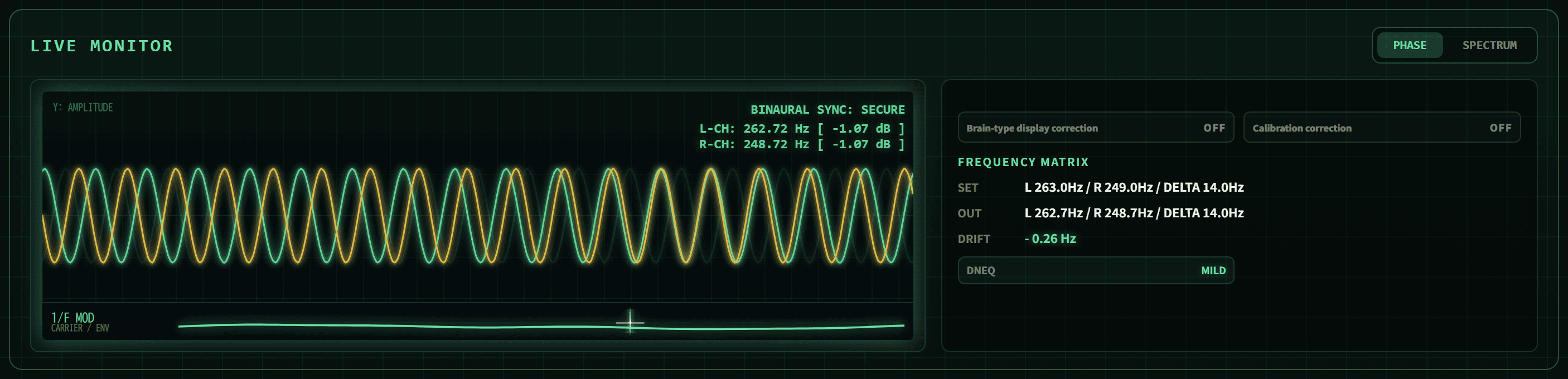
The BIFROST live monitor showing BINAURAL SYNC: SECURE, L-CH 262.72Hz / R-CH 248.72Hz, and a frequency matrix with SET, OUT and DRIFT
The current gap

A label describes the intent. It does not show the signal at playback.

A track name can describe how it was made, but it cannot show the live left–right difference, phase, or carrier-to-background level. BIFROST presents those as in-app measurements.

Audio source
Prerecorded trackA fixed audio file
BIFROSTGenerated live on your device
Live signal
Prerecorded trackStated in the title or description
BIFROSTSet values and live output shown side by side
Carrier/background overlap
Prerecorded trackNot visible
BIFROSTDNEQ narrows only the overlapping band
Session data
Prerecorded trackNo session log
BIFROST156 fields recorded over time
Ways to adjust
Prerecorded trackSwitch tracks
BIFROSTAdjust intent, background, DNEQ, and level during a session

The display and log cover signals inside BIFROST. They do not measure later OS or hardware processing, sound pressure at your ears, headphone fit, or perception.

Features

Simple on the surface. Deep when you need it.

Start by choosing headphones or speakers. Headphone mode sets a goal and optional background; speaker mode selects a source and AM. Studio, Player, and SAOR add deeper control when you need it.

Ten goal-based sessions
FOCUS and STUDY are available on FREE. The remaining eight unlock with FULL ACCESS.
Layer 19 background sounds
Core set on FREE / all 19 on FULL ACCESS
Ten programs that evolve over time
Instead of a fixed frequency, the frequency and beat follow a designed curve as the session progresses. From the opening to the final stretch, it is never the same sound.
Use your own audio with Player and SAOR
Player loads files from your device; SAOR captures audio playing on your PC. Headphone mode combines that source with the carriers, while speaker mode applies AM to the selected source itself.
In-app screen · Background sound · 19 options across three categories
The BIFROST background library with noise, environment, and relaxation music categories
Proof

Go beyond guesswork.

BIFROST shows the signal being generated and processed inside the app, then saves a session log. Check your settings and playback conditions without relying on impressions alone.

SET → OUT
The preset target beside the current in-app generated value. DELTA reads 14.0 Hz on both rows.
DRIFT −0.27Hz
The carrier has shifted slightly under 1/f drift while the left–right difference remains at its target.
Session log
Carrier frequencies, beat difference, the state of each DSP process and how the measurements moved, recorded as a time series. Export it and check for yourself.
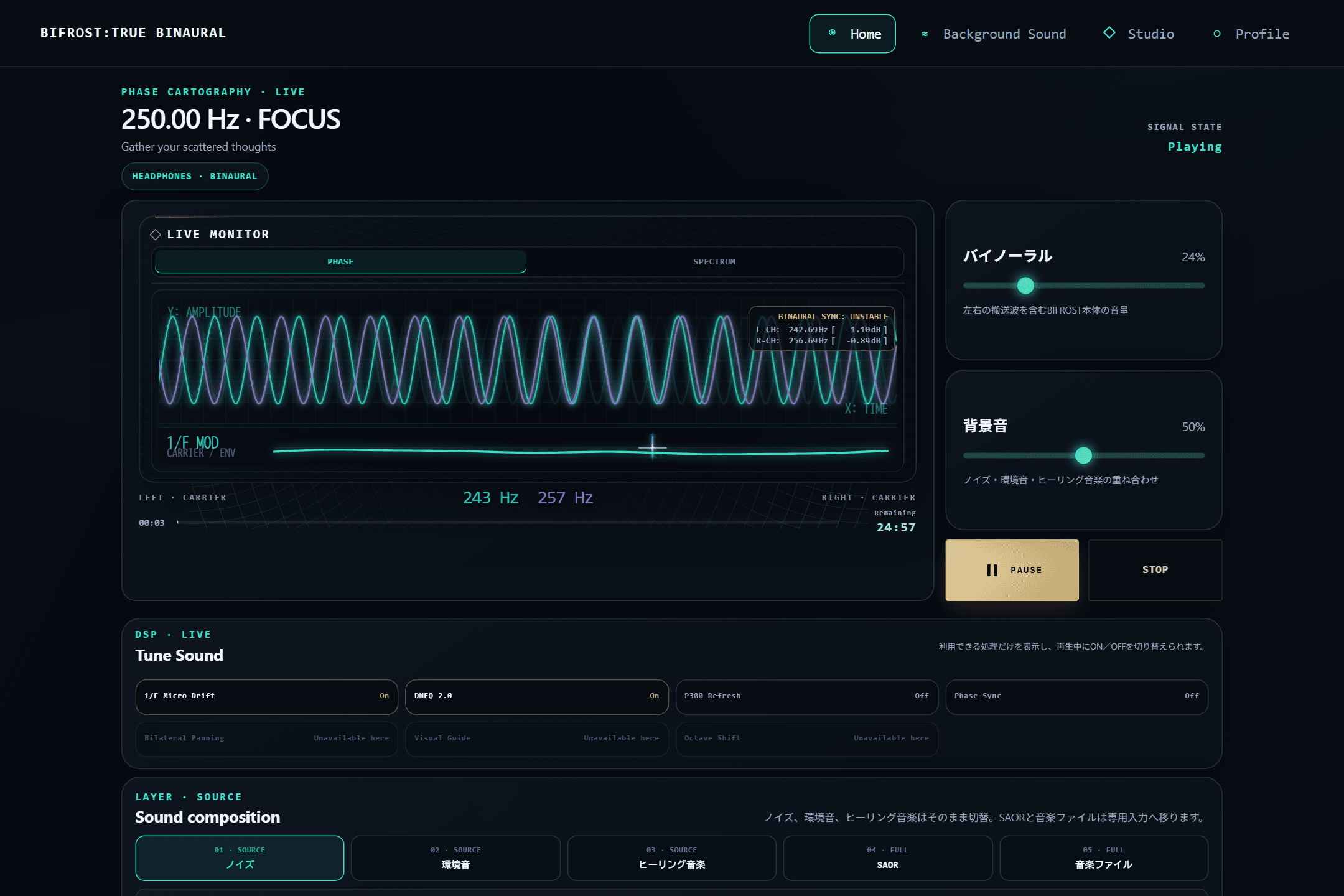
In-app screen · During playback · live monitor and DSP state
BIFROST during playback, with the live monitor and the available DSP processes

Generated at playback

The left and right carriers are generated live on your device rather than played from a distributed recording. The live monitor shows the signal inside BIFROST; processing added later by the OS, connection, or playback hardware is outside its measurement scope.

See the in-app signal state

The app analyzes its audio signal continuously and keeps phase, spectrum, and carrier-to-background levels on screen. It does not measure sound pressure at your ears or perception.

See what needs attention

If the setup needs attention, BIFROST points to the likely cause—level, playback method, or layered sound—so you can adjust it.

Defined design range

A clear boundary for everyday listening.

BIFROST Phase Sync operates above 0 Hz and below 30 Hz. At 30 Hz and above, it is bypassed automatically. This limit describes product behavior, not medical efficacy.

On the patent

The core signal control architecture is the subject of an application filed with the Japan Patent Office (application 2026-099039, June 2026, together with a priority-claiming follow-on). “Patent pending” indicates that an application has been filed. It does not guarantee that a patent will be granted, nor define any scope of rights.

Read the technical note →
Pricing

Choose the level of control you need.

FREE includes the core features. FULL ACCESS is the only paid plan and includes every BIFROST feature. Try everything free for five days before choosing.

FREE
$0

A core set you can start with now

  • FOCUS and STUDY
  • White / pink / brown noise
  • Ocean and wind, two relaxation tracks
  • Headphone playback
  • Live monitor
Start with FREE
FULL ACCESS
$9.99/ month

Every BIFROST feature, in one plan

  • Every current BIFROST feature
  • Studio: 10 programs whose sound shifts over time
  • Layer over your own music or work audio (Player / SAOR)
  • Spatial Centering and Octave Shift
Start 5-day free trial
Recommended
FULL ACCESS · ANNUAL
$79.99/ year

Save $39.89 (33%) versus 12 monthly payments

$79.99 billed annually until canceled

  • Every current BIFROST feature
  • Studio: 10 programs whose sound shifts over time
  • Layer over your own music or work audio (Player / SAOR)
  • Spatial Centering and Octave Shift
Choose annual access

Secure checkout and billing by Stripe

Five-day trial, no card required
The trial does not start a paid subscription or charge automatically
Cancel future renewals any time; access continues through the paid period
Questions, answered plainly

Before you press play

Do I need a credit card for the free trial?+

No. You can start the 5-day FULL ACCESS trial without entering any card details, and nothing is charged automatically when it ends.

How is this different from white noise?+

White noise masks distracting sound, and BIFROST includes three types of noise too. On top of that, BIFROST generates separate carriers for your left and right ears on the device, with a designed frequency difference between them. Beyond simply masking, you can see what frequency is playing on screen and match it to what you're doing.

What exactly makes this different from tracks on YouTube?+

YouTube plays a finished audio file. BIFROST generates the left and right carriers on your device and displays their beat frequency, phase, spectrum, and carrier-to-background S/N inside the app. The monitor reflects BIFROST’s internal signal; later processing by the OS or playback hardware is outside its scope.

Are headphones required?+

Binaural playback requires headphones or earphones to deliver separate carriers to the left and right ears. Speaker mode on FULL ACCESS is a separate method that applies AM to the selected source; it does not play binaural carriers through speakers.

Is it safe to use? Is there anyone who shouldn't?+

BIFROST is an audio tool, not a medical device. Don't use it while driving, operating machinery, or in any situation that needs your attention. If you have a history of epilepsy or seizures, a heart condition, a pacemaker, a psychiatric or neurological condition, hyperacusis, or are pregnant or may be pregnant, please consult a physician before use. Start at a safe volume and stop immediately if you feel unwell.

Can I use it while under medical care or on medication?+

BIFROST is an audio tool, not a treatment. If you have a medical condition or are under care or on medication, please consult your doctor before use, just to be safe. BIFROST is not a substitute for medication or medical treatment.

What if I don't notice much of an effect?+

Responses vary from person to person. First, use headphones or earphones (binaural needs left/right separation), in a quiet environment, with a session that matches your goal. Start at a low volume and adjust; if you layer a background sound, DNEQ can make room around the carrier band. BIFROST doesn't guarantee a specific effect — it's a tool that lets you adjust your own conditions and see for yourself.

Can I preview Studio on FREE?+

Studio and its ten evolving programs are available only with FULL ACCESS. During the 5-day FULL ACCESS free trial, all current features, including Studio, are available without restriction.

Can I cancel at any time?+

Yes, through your billing provider's management page. Cancellation stops the next charge, and access continues until the paid period ends. Stripe processes the monthly and annual plans on the standard sales route; Digistore24 processes the monthly plan on the dedicated DIGISTORE24 route.
When you are ready

Five days with the complete BIFROST workspace.

Try Studio, Player, SAOR, and both headphone and speaker modes. No card is required, and the trial does not convert to a paid plan automatically.

No credit card required

Contact / Technical Support

Have a technical question? Talk to the team building BIFROST.

Use this form for technical support, deployment questions, billing, or account issues. Requests are reviewed by Cloud Nine LLC, the team operating BIFROST, and routed by priority.

Legal Contact
info@cloud9llc.jp
Backup Support Email
info@bifrostaudio.com
Operator
Cloud Nine LLC
6-665-1 Gakuen Yamato-cho, Nara, Nara 631-0041, Japan

Requests are reviewed directly by Cloud Nine LLC and triaged by priority. Billing inquiries should include the email used at checkout.

Medical & Legal Disclaimer

BIFROST is a general-purpose audio tool, not medical care or a medical device. It does not diagnose, treat, cure, or prevent disease. Never use it during driving or hazardous work. For an implanted medical device, follow your doctor’s and manufacturer’s instructions and keep magnets and wireless equipment at least 15 cm (6 in) away unless stricter guidance applies. Stop immediately if you feel unwell.

NOT A MEDICAL DEVICE

BIFROST is offered as a general-purpose binaural audio tool, not as medical care or a medical device. It is not intended to diagnose, treat, cure, mitigate, or prevent any disease or condition. Any perceived effect is subjective and not clinically validated.

PROHIBITED USES

Do not use BIFROST while operating a motor vehicle, heavy machinery, industrial equipment, or in any situation where reduced awareness of your surroundings could put you or others at risk.

HEALTH CONDITIONS — CONSULT A PHYSICIAN

If you have or suspect you have epilepsy or a history of seizures; cardiac conditions or arrhythmias; a pacemaker or implanted cardiac device; a psychiatric or neurological disorder; sound sensitivity; or if you are pregnant or trying to become pregnant — consult a licensed physician before using BIFROST. If you use an implanted medical device such as a cardiac pacemaker, follow instructions from your doctor and the device manufacturer; as a general rule, keep magnets and wireless equipment, including your device and earphones or headphones, at least 15 cm (6 in) from the implant, unless a stricter individual instruction applies. Stop use immediately and seek medical attention if you experience seizure, chest pain, severe dizziness, disorientation, nausea, or any unusual symptom.

LIMITATION OF LIABILITY — USE AT YOUR OWN RISK

Use BIFROST responsibly and follow these safety instructions. Liability is governed by the Terms of Service; nothing here excludes liability or consumer, privacy, conformity, refund, withdrawal, or other rights that cannot be limited under applicable law.

USE BY MINORS

Children under 13 may not use BIFROST. A minor aged 13 or older may use it only with consent from a parent or legal guardian and an age-appropriate, supervised session length.

BIFROST — Real-time binaural audio for focus, reset, and rest.